Daniel Mid – Cargo Trailer Conversion Video Resource

Daniel Mid – Cargo Trailer Conversion Video Resource

During my research into different approaches for building out a cargo trailer conversion, I came across the YouTube channel
Daniel Mid. His channel features a large collection of videos documenting his own CTC build, covering everything from
flooring and insulation to plumbing, electrical work, and exterior modifications.

You can view his full video library here:

https://www.youtube.com/@danielmid6022/videos


Why This Channel Is Useful

Daniel’s videos provide practical, real‑world examples of how to approach many of the same challenges I’ll be tackling in this build.
His content is hands‑on, detailed, and filmed during an actual conversion, making it a valuable reference for planning and troubleshooting.

  • Step‑by‑step demonstrations of common CTC tasks
  • Real installation footage rather than theoretical diagrams
  • Multiple system walkthroughs (plumbing, electrical, flooring, etc.)
  • Creative solutions for space management and layout
  • Progress‑based videos that show how each phase builds on the last

Examples of Topics Covered

His channel includes a wide range of videos relevant to cargo trailer conversions, such as:

  • Flooring installation and subfloor preparation
  • Exterior plumbing routing and tank placement
  • Wall and ceiling insulation methods
  • Electrical system planning and wiring
  • Interior framing and layout decisions
  • Ventilation and climate control considerations

One example currently open in my browser is his update video covering flooring and exterior plumbing, which provides a clear look at how he approached under‑trailer routing and interior finishing.


How I Plan to Use This Resource

As I continue designing and documenting my own CTC build, I’ll be referencing Daniel’s videos for:

  • Installation ideas and alternative methods
  • Visual examples of under‑frame plumbing layouts
  • Flooring and insulation techniques
  • General sequencing of build phases

This channel will serve as an ongoing reference point as I refine my systems and layout plans.

Stromberg Carlson 2026 Product Catalog

Stromberg Carlson 2026 Product Catalog

While researching stabilization, leveling, and exterior accessory options for the cargo trailer conversion, I came across the

Stromberg Carlson 2026 Product Catalog
.
This catalog is packed with RV and trailer accessories that can be adapted for a cargo trailer conversion, especially for stability, access, storage, and exterior utility.

Below is a breakdown of the most relevant sections from the catalog index and how they may apply to this build.


Stabilizing & Leveling

Stromberg Carlson offers a wide range of stabilizing and leveling products that can complement the trailer’s scissor jacks and wheel chocks.

  • Base Pads / Base Pad Extreme / Base Pad Peak: Heavy-duty pads for stabilizer jacks to prevent sinking and improve stability.
  • Base Pad Leveler: A leveling solution for side-to-side adjustments without stacking wood.
  • Scissor Jack Shoes: Adds grip and stability to scissor jacks.
  • Kits – Stabilizing & Leveling: Bundled solutions for multi-point stabilization.
  • T-Chock: A heavy-duty wheel chock alternative.
  • Stabil-Step: Reduces bounce when entering or exiting the trailer.

Steps, Handrails & Access

These products enhance safe entry and exit from the trailer, especially useful with the increased interior height.

  • Lend-A-Hand / Locking Lend-A-Hand: Folding handrails for the RV side door.
  • Extended Rail & Banister Rail: Additional support options.
  • Manual RV Steps / Platform Steps: Alternatives or upgrades to the pull-out RV step.
  • Rail Mate: A compact handrail system.

Tongue & Front-Mounted Accessories

Since the tongue area of this build will house major systems (HVAC condenser, propane, etc.), these accessories offer additional functionality and organization.

  • Trailer Tray: A front-mounted platform for generators, storage boxes, or equipment.
  • Tongue Jack Dolly Chock: Helps stabilize and maneuver the tongue jack.
  • Electric Tongue Jacks & Covers: Useful if upgrading from a manual jack.
  • Gen Secure II: A locking generator cage for added security.

Rear & Exterior Utility

These accessories can enhance the garage area or provide additional exterior storage options.

  • Bumper Mounts / Bumper Receiver: Mounting points for racks or carriers.
  • Cargo Caddy & Cargo Caddy Bike Rack: Rear-mounted cargo solutions.
  • Bike Bunk: A front-mounted bike carrier above the tongue.
  • Clothes Line (Bumper Mount): A simple but useful outdoor accessory.

Ladders & Ladder-Mounted Accessories

If roof access becomes necessary for solar, maintenance, or storage, these products may be useful.

  • Ladders: Various RV ladder options.
  • Ladder Bike Rack / Ladder Chair Rack: Creative ways to mount gear externally.
  • Ladder Replacement Parts: Hardware and accessories.

Outdoor Living Accessories

These items aren’t essential but could enhance the outdoor setup when the trailer is parked.

  • Extend-A-Shower: Adds temporary shower space.
  • Stake & Grill: Outdoor cooking accessory.
  • Hot Stick: Campfire cooking tool.
  • Hose & Cord Caddy: Helps organize utilities in the garage area.

Why This Catalog Is Useful

The Stromberg Carlson catalog provides a wide range of accessories that can be adapted for a cargo trailer conversion.
Many of these products are designed for RVs, but the concepts translate directly to this build — especially for stability, access, and exterior utility.

As the build progresses, I’ll reference specific products from this catalog and document how they integrate into the overall design.

Importing Categories in WordPress: A Simple and Effective Solution

I got this idea from: Importing Categories in WordPress: A Simple and Effective Solution – Noman Shah – AI Visionary | Inventor | Author | Entrepreneur

I built upon his solution to fit my website.

Introduction:

Organizing content efficiently is crucial for any blog or website. Categories play a significant role in this by helping readers navigate through different topics. However, importing a large number of categories into WordPress can be challenging. I recently faced this issue and tried several out-of-the-box solutions. Here’s how I overcame the problem with a simple tweak that made my life easier.

The Problem:

I needed to import a large number of categories into my WordPress site. Doing this manually was not an option due to the sheer volume. Naturally, I turned to plugins that promised to handle CSV imports effortlessly. However, I quickly encountered several roadblocks:

  • Some plugins failed to upload the CSV files correctly.
  • Others required paid versions to access CSV import features.

Possible Out-of-the-Box Solutions:

  1. WP All Import: Initially, I tried WP All Import, a popular plugin that handles various import tasks. Unfortunately, the free version doesn’t support taxonomy imports, which includes categories.
  2. WP Ultimate CSV Importer: Next, I looked into WP Ultimate CSV Importer. While it’s a robust tool, the CSV import feature for taxonomies is locked behind a paywall.

These limitations prompted me to think outside the box. I needed a solution that didn’t rely on paid plugins or cumbersome workarounds.

The Solution:

After some research and a bit of experimentation, I devised a simple yet effective solution. The idea was to convert my categories CSV into a PHP script, add it to my theme’s functions.php file, and execute it by opening a page. Here’s how I did it:add it to my theme’s functions.php file, and execute it by opening a page. Here’s how I did it:

  1. Convert CSV to Script: First, I prepared a list of categories and subcategories in an array format. Here’s an example with three main categories and three subcategories in each:
function create_blog_categories() {
    $categories = [
        ['name' => 'Technology', 'slug' => 'technology', 'description' => 'All about technology', 'parent' => ''],
        ['name' => 'AI and Machine Learning', 'slug' => 'ai-machine-learning', 'description' => 'Advancements in AI and ML', 'parent' => 'Technology'],
        ['name' => 'Blockchain', 'slug' => 'blockchain', 'description' => 'Blockchain technology and its applications', 'parent' => 'Technology'],
        ['name' => 'Health', 'slug' => 'health', 'description' => 'Health and wellness tips', 'parent' => ''],
        ['name' => 'Mental Health', 'slug' => 'mental-health', 'description' => 'Mental health awareness and tips', 'parent' => 'Health'],
        ['name' => 'Physical Health', 'slug' => 'physical-health', 'description' => 'Physical health and fitness', 'parent' => 'Health'],
        ['name' => 'Travel', 'slug' => 'travel', 'description' => 'Travel tips and destination guides', 'parent' => ''],
        ['name' => 'Travel Tips', 'slug' => 'travel-tips', 'description' => 'Tips for a better travel experience', 'parent' => 'Travel'],
        ['name' => 'Destination Guides', 'slug' => 'destination-guides', 'description' => 'Guides to various travel destinations', 'parent' => 'Travel']
    ];

    foreach ($categories as $category) {
        $parent_id = 0;
        if (!empty($category['parent'])) {
            $parent = get_term_by('name', $category['parent'], 'category');
            $parent_id = $parent ? $parent->term_id : 0;
        }

        if (!term_exists($category['slug'], 'category')) {
            wp_insert_term(
                $category['name'],
                'category',
                [
                    'description' => $category['description'],
                    'slug' => $category['slug'],
                    'parent' => $parent_id
                ]
            );
        }
    }
}
// Uncomment the line below to run the function once
// create_blog_categories();
  1. Add the Script to functions.php: I added this script to my theme’s functions.php file. Here’s how you can do it:
    • Go to Appearance > Theme Editor.
    • Open functions.php.
    • Paste the script at the end of the file.
    • Uncomment the line // create_blog_categories(); to run the function.
  2. Run the Script: To execute the script, I simply loaded any page of my WordPress site. This created the categories and subcategories as specified in the array.
  3. Comment Out the Script: After the categories were created, I commented out the line create_blog_categories(); to prevent the function from running on every page load.

Takeaway:

By converting the CSV data into a script and running it through functions.php, I was able to import categories into WordPress without relying on paid plugins. This simple tweak saved me a lot of time and effort, and it can do the same for you. If you’re facing similar issues, give this method a try and see how easy it can be to manage your WordPress categories.

Feel free to adjust the categories and subcategories as per your needs, and happy blogging!
Posted in Guides and Tutorials, How-To Guides


Design Applications

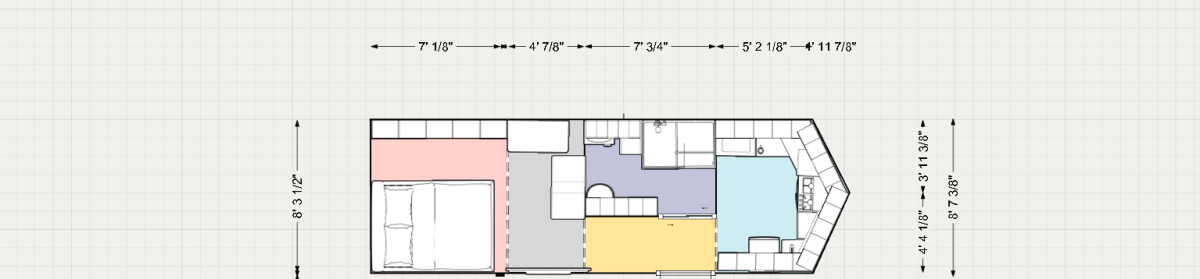
What Is a Floor Plan in Designing?

A floor plan is a scaled diagram of a room or building viewed from above. It illustrates the horizontal relationships of interior spaces, walls, and features at a single level of a structure. Floor plans are typically drawn in orthographic projection and usually represent the layout as if viewed from approximately 4 feet (1.2 m) above the finished floor.

The level of detail in a floor plan depends on the design phase. Early schematic plans may show only major spatial divisions and rough square footages, while construction‑ready plans include wall types, dimensions, fixtures, finishes, and electrical symbols. Floor plans may also include notes, material callouts, and renderings depending on the intended use.

Applications I Use for Floor Plan & Design Work